PWA and themes
The OmniForge dashboard is an installable Progressive Web App (PWA). Installing gives it its own window and icon. It doesn't make OmniForge work offline: saving, running and installing packages always need the server.
Can I install it?
Browsers only allow installation, and only run the service worker, in a secure context. The dashboard checks window.isSecureContext and doesn't register its service worker otherwise.
| How you open the dashboard | Service worker and install |
|---|---|
https://omniforge.your-domain.example with a trusted certificate |
Yes |
http://localhost:8000 or http://127.0.0.1:8000 on the same machine |
Yes (browsers treat localhost as secure) |
http://your-host:8000 over the LAN |
No. The dashboard works normally but can't be installed and has no offline page |
Installing
- Chrome, Edge and other Chromium browsers: select Install app in the dashboard's top bar when it appears, or use the browser's install icon or menu.
- iPhone and iPad: open the dashboard in Safari, then Share → Add to Home Screen.
- Other browsers: look for an install or "add to home screen" option in the menu.
After installing, OmniForge shows "OmniForge installed. Tool execution still needs the server."
HTTPS for installation
The usual way to get HTTPS on a LAN is a reverse proxy with a certificate your devices trust. For example, with Caddy and a domain you control:
omniforge.your-domain.example {
    reverse_proxy your-host:8000
}
[!WARNING] HTTPS encrypts the connection. It doesn't add authentication. Keep the proxied name resolvable or reachable only inside your network, or put an IP allow-list on the proxy. Don't use proxy-level Basic auth on
/mcp: it would collide with theAuthorization: Bearerheader MCP clients send.
What the app stores on your device
| Store | Contents |
|---|---|
Service worker cache omniforge-public-v2 |
Exactly 12 public files: offline.html, product.css, mark.svg, favicon.svg, favicon-32.png, apple-touch-icon.png, icon-192.png, icon-512.png, icon-maskable-512.png, manifest.webmanifest, fonts/manrope.ttf and fonts/jetbrains-mono.ttf (all under /assets/) |
localStorage key omniforge-theme |
system, light or dark |
That's all. The service worker never caches the dashboard HTML, anything under /api or /mcp, tool code, test inputs, results or credentials. It ignores non-GET requests, cross-origin requests and any request with an Authorization header. Drafts and test inputs live only in the open tab's memory.
The cached files are fetched with credentials: 'omit'. Redirects are refused, and each file must arrive with the expected MIME type, so a login page served by a proxy can't be cached in place of a stylesheet or font.
Offline behaviour
- An open tab that loses its connection shows the banner You're offline…. Your draft stays in place, and Save, Run / Test, the enable switches and Add all missing examples are disabled until the connection returns.
- Opening the app while offline, or while the server is down, shows a generic Reconnect page from the cache, never a stale copy of your tools.
- Navigation is network-first. Successful pages are never stored.
Updates
When a new version of OmniForge changes the service worker, the browser downloads it in the background and the top bar shows Update available.
- Nothing changes until you select Update available.
- If you have unsaved changes, you're asked to confirm first: Reload to update?
- Only the tab you accept in reloads. Other open tabs are left alone so their drafts survive. Reload them yourself when ready.
Maintainers: increment the CACHE name in app/static/sw.js (for example omniforge-public-v2 → v3) whenever an allow-listed asset changes. On activation, the worker deletes only older omniforge-public-* caches. See Release and deployment (repository access required).
Themes
Choose Appearance at the bottom of the desktop rail, or top right on a phone:
| Option | Behaviour |
|---|---|
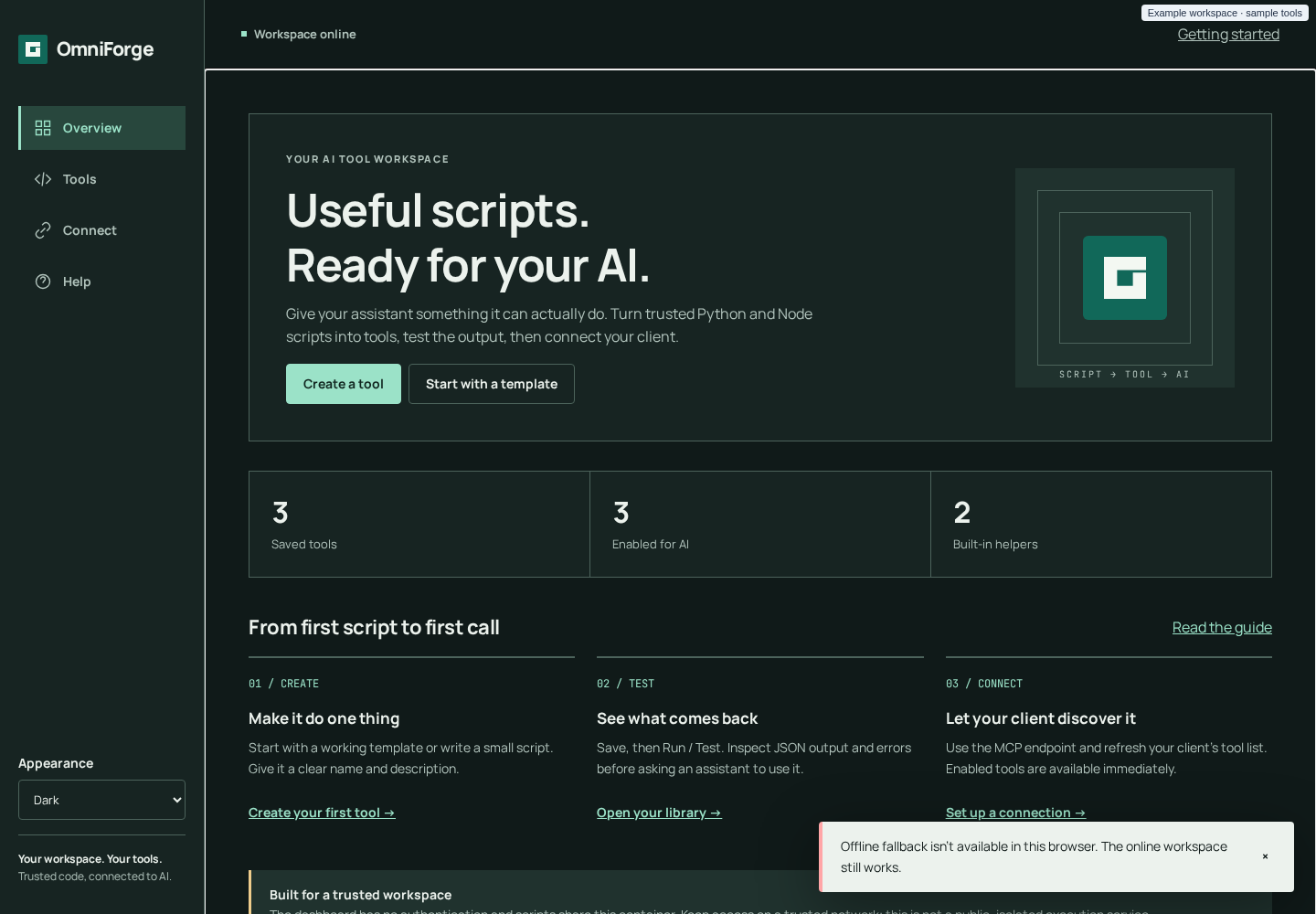
| System (default) | Follows the operating system's light/dark setting and switches live when it changes |
| Light | Warm neutral canvas, dark ink text, teal accent (#116859) |
| Dark | Deep green-grey canvas (#101a19), light text, mint accent (#9be2c8) |
The choice is saved per browser in localStorage under omniforge-theme. If storage is blocked, the theme falls back to System for each visit. The browser's address-bar colour (theme-color) follows the theme.
Type and icons
- Manrope for the interface and JetBrains Mono for code, both self-hosted under the SIL Open Font Licence (
app/static/fonts/). No font CDN or other third-party request is made. - The OmniForge mark is a square frame with an opening: a script entering a contained workspace and returning output. It's provided as SVG and PNG favicons, a 180 px Apple touch icon, 192 and 512 px app icons, and a 512 px maskable icon.
- Corners are 4 px at most, and the spacing follows a 4/8 px rhythm.
Motion and accessibility
prefers-reduced-motion is respected. Large text, landscape phones and 44 px minimum touch targets are covered by the browser test suite. See Dashboard guide → Accessibility (repository access required).